

Download Xbox One Controller Tester – Free, Secure & Easy-to-Use Tool for Windows
Looking to test your Xbox One controller or find the perfect one for gaming? The Xbox One Controller Tester by Sp777 is a powerful, free Windows desktop application designed to help gamers quickly evaluate controller performance, detect input lag, and verify button responsiveness. Whether you're a casual player or a competitive gamer, this tool ensures your controller delivers optimal precision and reliability.
With support for Xbox One, Xbox 360, and various controller variants, Sp777 offers a comprehensive testing environment that’s both intuitive and accurate. The software is ideal for identifying faulty controllers, comparing multiple units, or verifying compatibility before purchase. No more guessing if your controller is working properly—Sp777 gives you real-time feedback on every input.
It’s a must-have for gamers who demand peak performance from their hardware.
Comprehensive Testing Features for Every Gamer
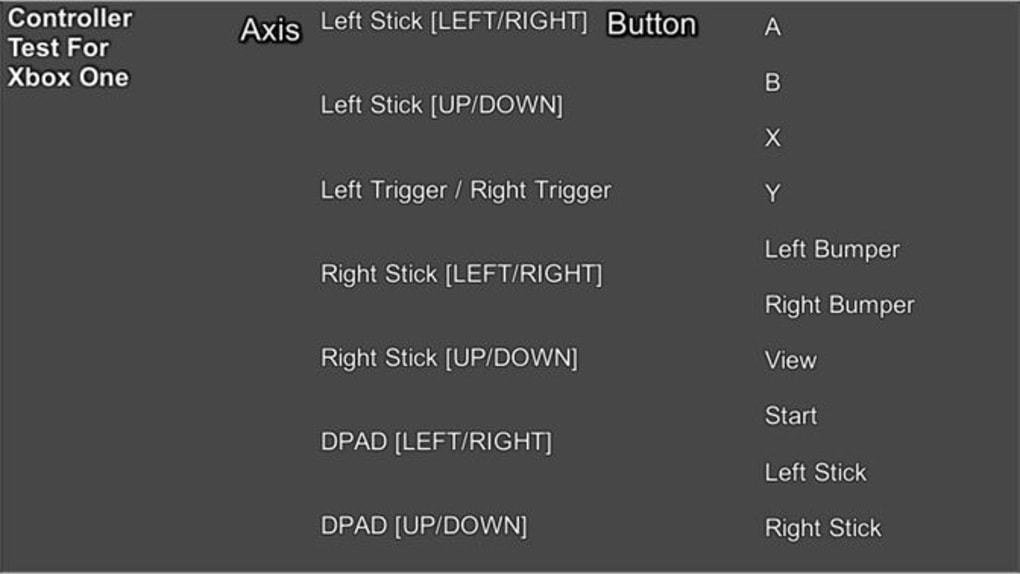
Sp777 Controller Tester stands out with a rich set of features tailored to both beginners and advanced users. The software supports real-time input monitoring, allowing you to see every button press, stick movement, and trigger response instantly on-screen. This visual feedback is invaluable when diagnosing issues like drift, unresponsive buttons, or inconsistent analog stick performance.
The interface is clean and user-friendly, displaying a dynamic layout that mimics a virtual controller, making it easy to interpret results. One of the standout features is the customizable test mode, where you can select specific inputs to test—perfect for isolating problems in a single axis or button. Additionally, the tool includes a logging function that records all inputs over time, enabling you to analyze patterns and detect intermittent failures.
For those upgrading from older models, Sp777 supports legacy controllers like the Xbox 360 Wireless, Elite, and Racing Wheel, ensuring backward compatibility. The software also features a calibration assistant that helps adjust sensitivity settings for optimal gameplay. With built-in diagnostics, automatic updates, and a lightweight design, Sp777 ensures you’re always using the latest version without compromising system performance.
Whether you're testing a new controller or troubleshooting an old one, this tool delivers reliable, accurate results.
Easy Installation & Seamless Usage on Windows, Mac, and More
Getting started with Sp777 Controller Tester is simple and hassle-free. The software is available as a free download for Windows users, with no installation required—just extract the ZIP file and run the executable. This portable design means you can use it on any Windows PC without leaving traces or affecting system settings.
For Mac users, a compatible version is also available, ensuring cross-platform accessibility. The tool automatically detects connected Xbox controllers via USB or Bluetooth, eliminating the need for manual configuration. Once connected, the interface updates in real time, showing live input data with color-coded indicators for each component.
If you're testing multiple controllers, Sp777 allows you to switch between devices seamlessly. The software is lightweight, consuming minimal CPU and RAM, so it won’t interfere with your gaming sessions. For those who prefer mobile access, Sp777 also offers a companion app for Android and iOS devices, letting you monitor controller performance remotely.
The app syncs with your desktop version, giving you a full view of input data from anywhere. Regular updates are pushed through the official website, ensuring compatibility with new controller models and Windows updates. Whether you're at home, in a gaming café, or testing controllers at a trade show, Sp777 is always ready to go.
Its secure download process and virus-free status make it a trusted choice for gamers worldwide.
Pros and Cons: What You Need to Know Before Downloading
- Pros:
- Free to download and use with no hidden fees
- Supports Xbox One, Xbox 360, and legacy controller models
- Real-time input visualization with color-coded feedback
- Lightweight and portable—no installation needed
- Automatic updates and secure download process
- Available for Windows, Mac, Android, and iOS
- Excellent for diagnosing drift, lag, and unresponsive inputs
- Cons:
- Mobile app lacks advanced testing modes available on desktop
- Limited support for non-Xbox controllers
- No built-in repair tools—only diagnostics
- Occasional Bluetooth pairing delays on older Windows versions
- Interface could benefit from more customization options
Frequently Asked Questions (FAQ)
Is Xbox One Controller Tester free to download?
Yes, Sp777 Controller Tester is completely free to download and use. There are no premium features locked behind a paywall, and the software remains ad-free. You can use it indefinitely without any cost.
Does it work with Xbox 360 controllers?
Absolutely. Sp777 supports all Xbox 360 controller models, including the Wireless, Elite, Racing Wheel, and Avatars. It’s one of the few tools that maintain full compatibility with older Xbox hardware.
Can I use it on Mac and mobile devices?
Yes, Sp777 offers versions for macOS, Android, and iOS. The desktop app runs on Windows and Mac, while the mobile app allows remote monitoring of controller inputs.
How do I fix drift detected by the tool?
Sp777 only detects drift—it doesn’t repair it. However, it helps identify the exact axis or stick causing the issue. You can then use third-party repair kits or send the controller for professional servicing.
Is the software secure?
Yes, Sp777 is virus-free and downloaded through secure channels. The software does not collect personal data or install unwanted programs. It’s trusted by thousands of gamers globally.
Final Verdict: A Must-Have Tool for Every Xbox Gamer
If you're serious about your gaming setup, the Xbox One Controller Tester by Sp777 is an essential tool. Whether you're buying a second-hand controller, troubleshooting performance issues, or simply verifying your device’s functionality, this software delivers accurate, real-time diagnostics. Its multi-platform support, intuitive interface, and comprehensive testing capabilities make it a top choice for gamers of all levels.
While it doesn’t offer repair functions, its ability to pinpoint problems quickly saves time and money. The free model, combined with regular updates and strong security, ensures long-term reliability. For anyone who values precision and performance, this tool is a game-changer.
Don’t risk playing with a faulty controller—download Sp777 today and take full control of your gaming experience.
Ready to test your controller? Download Xbox One Controller Tester now—free, secure, and ready to use.







